 ListLasso
One click, no setup
ListLasso spots the list or table on the page and outlines it. Not the right one? Try another, or click an item to pick it yourself.
Click the ListLasso icon on a page of products, listings, search results or a data table. It finds the rows, follows the "Next" pages and saves everything to Excel, CSV or Google Sheets. It all happens in your browser: no account, no cloud, nothing uploaded.
Coming soon to the Chrome Web Store
Free to use. Pro adds unlimited pages, detail pages and saved templates. Desktop Chrome 116 or newer.
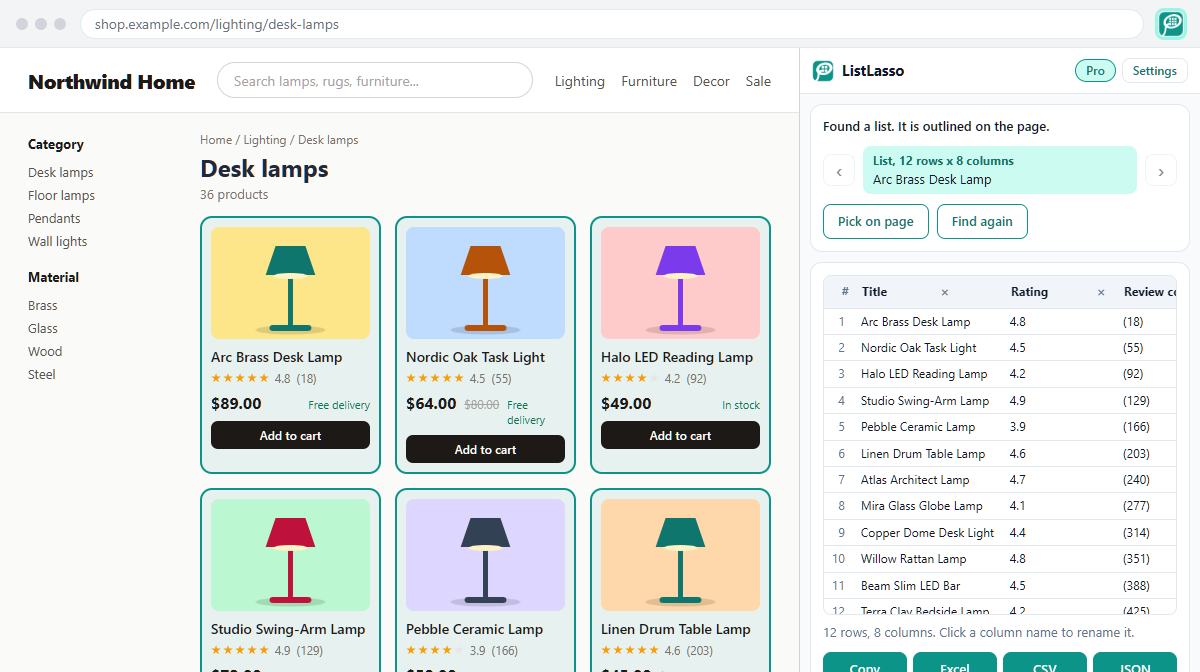
ListLasso spots the list or table on the page and outlines it. Not the right one? Try another, or click an item to pick it yourself.
Pages are read inside your browser. What you scrape is never sent to us or to any server. No account, no tracking, no cloud credits.
Follows "Next" buttons, clicks "Load more" or scrolls endless lists, and leaves out rows it already has.
Columns get useful names like Title, Price and Rating, and full titles instead of cut-off ones. Rename or remove columns before you export.
Download a file, or copy the rows and paste them straight into Google Sheets or Excel.
Opens the link in each row and adds facts from that page, such as price, SKU, address, email and phone.
$0
$9.99/month
or $79 a year, or $199 once for life
Prices are in US dollars; local taxes are added at checkout. Payments are handled by Dodo Payments, our merchant of record. 14-day money-back guarantee, see the refund policy.
No. ListLasso reads the page inside your browser and keeps the rows there until you export or copy them. We have no servers that receive your pages or your data.
Most pages with a repeating list or a table: online shops, marketplaces, directories, job boards, search results, reviews and data tables. It also reads pages you are signed in to, because it sees what your browser shows. Chrome does not allow extensions on a few pages, such as the Chrome Web Store.
Use the arrows to try the other lists it found, or click "Pick on page" and then click any item of the list you want.
Yes. It clicks the "Next" button, clicks "Load more" or scrolls down, waits for the new rows and skips rows it already has. On endless feeds, each scroll that loads new rows counts as one page. The free plan gets up to 10 pages per list; Pro has no limit.
Collecting information that is publicly shown to you is generally allowed in many places, but each website's terms and laws on copyright and personal data still apply. Only collect data you are allowed to use, keep a polite pace (ListLasso waits between pages by default), and do not collect personal data without a lawful reason.
Pick a plan above. After paying, you get a license key on the confirmation page and by email. Open the ListLasso settings (right-click the ListLasso icon in Chrome and choose Options), paste the key under Your plan and click Activate.
We emailed it to you right after you bought Pro, so first search your inbox and spam folder. You can also open the customer portal, enter the email address you used to buy and open the sign-in link we send you. The portal shows your license key and invoices, and lets you manage your subscription.
Yes. Install ListLasso there and activate the same key under Your plan, as you did the first time. One key works in up to 3 Chrome browsers at once. Before you stop using a computer, reset it or uninstall ListLasso, click "Remove Pro from this browser" in the ListLasso settings to free that spot. If ListLasso says your key is already active on the maximum number of browsers and you can no longer remove it, email us from the address you used to buy and we will free up a spot for you.
Yes. Cancel any time with the link in your receipt email or in the customer portal, and Pro stays active until the end of the period you paid for. If Pro is not right for you, email us within 14 days of buying for a full refund.
To open the links in your rows, ListLasso needs your permission for those websites. Chrome asks you first, and only when you start detail pages. Without it, ListLasso can only read the tab where you clicked its icon.